
You can send a proposal to your client as a quote or estimate.
In the Proposal details section on the left hand side, check the box to 'Disable Payment' under Payment Methods.
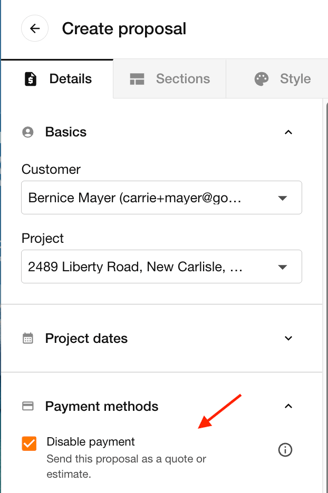
This will allow the client to view the proposal without needing to complete payment. Once the client has accepted the quote, you can then go back to the proposal, uncheck the Disable payment button, make edits (if needed), and resend the proposal so that client can complete the payment.
Important Notes
-
You can also toggle off the Contract section of your proposal and e-signatures for the quote if you'd prefer they don't sign yet. Once they've approved the quote, you can then toggle the Contract and e-signatures back on for signature and payment.
-
You can continue to make edits to the proposal as long as it has not yet been accepted.