
Auto Renewals let you automatically charge customers on a recurring schedule—ideal for staging rental fees or other recurring services billed weekly or monthly. Set up the renewal plan when creating the initial staging invoice.
How It Works
- Create an invoice for the initial staging service.
- Enable Auto Renewals and configure the renewal plan.
- Your customer pays the initial invoice.
- Titus automatically charges future renewals on the schedule you set.
- Customers receive an email reminder before each renewal charge.
- You can pause, modify, or cancel the renewal plan at any time.
Setting Up a Renewal
When creating or editing an invoice, scroll to the Renewals section under Billing and enter the following information:
- Plan name: A descriptive name for the recurring plan (for example, Monthly Staging Rental).
- Description: Optional details about the recurring service.
- Amount: The recurring charge amount.
- Start date: When the renewal plan begins.
- Frequency: Weekly or monthly.
- First charge date: The date of the first automatic renewal payment.
Payment Methods
Customers can pay renewal charges using either a credit or debit card or bank transfer (ACH).
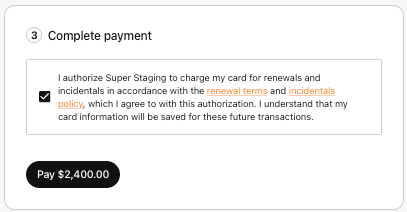
When a customer enrolls in ACH renewals, they must agree to a clear authorization allowing Titus to debit their bank account for the recurring renewal amount. The authorization is presented during checkout so customers know exactly what recurring payments they are approving.
If an ACH renewal payment is returned by the customer's bank, Titus automatically retries the payment before marking it as failed. You and your customer will only receive a payment failed email after all retry attempts have been exhausted, helping prevent unnecessary notifications for temporary banking issues.
What Your Customer Sees
When your customer receives the initial staging invoice, they'll see both:
- The current invoice payment.
- The Renewal Schedule, including the recurring amount and billing frequency.
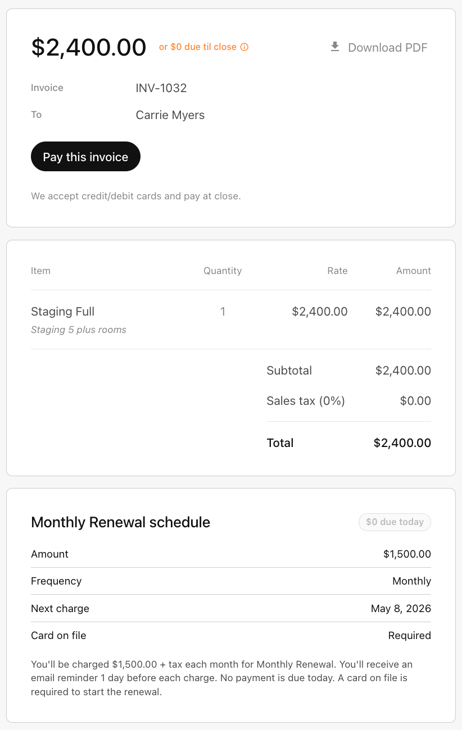
During checkout, customers must agree to the renewal terms before completing payment. If you've configured an incidentals policy, they'll review and accept those terms as well.
For more information about incidentals, see Managing Incidentals.
Notifications
Before each renewal charge:
- Customers receive an email reminder showing the upcoming charge amount and scheduled payment date.
- Businesses also receive an email reminder for the upcoming renewal.
If a renewal payment ultimately fails after all retry attempts, both you and your customer will receive a payment failure notification.
Managing Renewals
From your Invoices dashboard, select Renewals to:
- View active renewal plans.
- Pause or resume renewals.
- Cancel recurring plans.
- Edit the amount or schedule for future renewal charges.
Tips
- Cancel a renewal plan promptly once a property has been destaged.
- Use descriptive plan names so customers can easily recognize recurring charges.
- Set the first charge date to align with your rental billing cycle.
- Notify your customer before making changes to an active renewal plan.
Need help?
Contact our support team at support@gotitus.com.